Topics:Data sonification, mapValue() and mapScale(), Kepler, Python strings, music from text, Guido d’Arezzo, nested loops, file input/output, Python while loop, big data, biosignal sonification, defining functions, image sonification, Python images, visual soundscapes.
Sonification allows us to capture and better experience phenomena that are outside our sensory range by mapping values into sound structures that we can perceive by listening to them. Data for sonification may come from any measurable vibration or fluctuation, such as planetary orbits, magnitudes of earthquakes, positions of branches on a tree, lengths of words in this chapter, and so on. More information is provided in the reference textbook.
In 1619 Johannes Kepler wrote his “Harmonices Mundi (Harmonies of the World)” book (Kepler, 1619).
This code sample (Ch. 7, p. 196) sonifies one aspects of the celestial organization of planets. In particular, it converts the orbital velocities of the planets to musical notes.
# harmonicesMundi.py## Sonify mean planetary velocities in the solar system.#frommusicimport*# create a list of planet mean orbital velocities# Mercury, Venus, Earth, Mars, Ceres, Jupiter,# Saturn, Uranus, Neptune, PlutoplanetVelocities=[47.89,35.03,29.79,24.13,17.882,13.06,9.64,6.81,5.43,4.74]# get minimum and maximum velocities:minVelocity=min(planetVelocities)maxVelocity=max(planetVelocities)# calculate pitchesplanetPitches=[]# holds list of sonified velocitiesplanetDurations=[]# holds list of durationsforvelocityinplanetVelocities:# map a velocity to pitch and save itpitch=mapScale(velocity,minVelocity,maxVelocity,C1,C6,CHROMATIC_SCALE)planetPitches.append(pitch)planetDurations.append(EN)# for now, keep duration fixed# create the planet melodiesmelody1=Phrase(0.0)# starts at beginningmelody2=Phrase(10.0)# starts 10 beats into the piecemelody3=Phrase(20.0)# starts 20 beats into the piece# create melody 1 (theme)melody1.addNoteList(planetPitches,planetDurations)# melody 2 starts 10 beats into the piece and# is elongated by a factor of 2melody2=melody1.copy()melody2.setStartTime(10.0)Mod.elongate(melody2,2.0)# melody 3 starts 20 beats into the piece and# is elongated by a factor of 4melody3=melody1.copy()melody3.setStartTime(20.0)Mod.elongate(melody3,4.0)# repeat melodies appropriate times, so they will end togetherMod.repeat(melody1,8)Mod.repeat(melody2,3)# create parts with different instruments and add melodiespart1=Part("Eighth Notes",PIANO,0)part2=Part("Quarter Notes",FLUTE,1)part3=Part("Half Notes",TRUMPET,3)part1.addPhrase(melody1)part2.addPhrase(melody2)part3.addPhrase(melody3)# finally, create, view, and write the scorescore=Score("Celestial Canon")score.addPart(part1)score.addPart(part2)score.addPart(part3)View.sketch(score)Play.midi(score)Write.midi(score,"harmonicesMundi.mid")
It plays this sound:
Making music from text
This code sample (Ch. 7, p. 202) demonstrates how to generate music from text. This program converts the values of ASCII characters to MIDI pitches. For variety, note durations are randomized; other note properties (volume, etc.) are the same for all notes.
# textMusic.py## It demonstrates one way to generate music from text.## * Note pitch is based on the ASCII value of characters.# * Note duration is selected from a weighted-probability list# (again, based on ASCII value).# * Note dynamic is selected randomly.## All other music parameters (panoramic, instrument, etc.)# are kept constant.frommusicimport*fromrandomimport*# Define text to sonify.# Excerpt from Herman Melville's "Moby-Dick", Epilogue (1851)text="""The drama's done. Why then here does any one step forth? - Because one did survive the wreck. """##### define the data structuretextMusicScore=Score("Moby-Dick melody",130)textMusicPart=Part("Moby-Dick melody",GLOCK,0)textMusicPhrase=Phrase()# create durations list (factors correspond to probability)durations=[HN]+[QN]*4+[EN]*4+[SN]*2##### create musical dataforcharacterintext:# loop enough timesvalue=ord(character)# convert character to ASCII number# map printable ASCII values to a pitch valuepitch=mapScale(value,32,126,C3,C6,PENTATONIC_SCALE,C2)# map printable ASCII values to a duration valueindex=mapValue(value,32,126,0,len(durations)-1)duration=durations[index]print("value",value,"becomes pitch",pitch,)print("and duration",duration)dynamic=randint(60,120)# get a random dynamicnote=Note(pitch,duration,dynamic)# create notetextMusicPhrase.addNote(note)# and add it to phrase# now, all characters have been converted to notes# add ending note (same as last one - only longer)note=Note(pitch,WN)textMusicPhrase.addNote(note)##### combine musical materialtextMusicPart.addPhrase(textMusicPhrase)textMusicScore.addPart(textMusicPart)##### view score and write it to a MIDI fileView.show(textMusicScore)Play.midi(textMusicScore)Write.midi(textMusicScore,"textMusic.mid")
One of the oldest known algorithmic music processes is a rule-based algorithm that selects each note based on the letters in a text, credited to Guido d’Arezzo (991 – 1033).
This code sample (Ch. 7, p. 207) is an approximation to d’Arezzo’s algorithm, adapted to text written in ASCII.
# guidoWordMusic.py## Creates a melody from text using the following rules:## 1) Vowels specify pentatonic pitch, 'a' is C4, 'e' is D4,# 'i' is E4, 'o' is G4, and 'u' is A4.## 2) Consonants are ignored, but contribute to note duration of# all vowels within a word (if any).#frommusicimport*# this is the text to be sonifiedtext="""One of the oldest known algorithmic music processes is a rule-based algorithm that selects each note based on the letters in a text, credited to Guido d'Arezzo."""text=text.lower()# convert string to lowercase# define vowels and corresponding pitches (parallel sequences),# i.e., first vowel goes with first pitch, and so on.vowels="aeiou"vowelPitches=[C4,D4,E4,G4,A4]# define consonantsconsonants="bcdfghjklmnpqrstvwxyz"# define parallel lists to hold pitches and durationspitches=[]durations=[]# factor used to scale durationsdurationFactor=0.1# higher for longer durations# separate text into words (using space as delimiter)words=text.split()# iterate through every word in the textforwordinwords:# iterate through every character in this wordforcharacterinword:# is this character a vowel?ifcharacterinvowels:# yes, so find its position in the vowel listindex=vowels.find(character)# and use position to find the corresponding pitchpitch=vowelPitches[index]# finally, remember this pitchpitches.append(pitch)# create duration from the word lengthduration=len(word)*durationFactor# and remember itdurations.append(duration)# now, pitches and durations have been created# so, add them to a phrasemelody=Phrase()melody.addNoteList(pitches,durations)# view and play melodyView.notation(melody)Play.midi(melody)
It plays this sound:
Sonifying biosignals
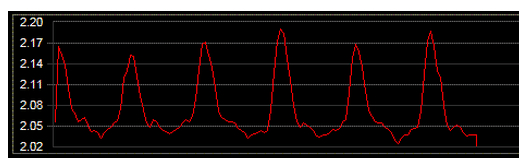
Here we explore pre-processing and sonification of data from biological processes. The figure below displays heart data, captured by measuring blood pressure over time.
Sample raw heart data (x-axis is time, y-axis is pressure)
The figure below displays skin conductance, captured by measuring electrical conductivity between two fingers over time.
Sample skin-conductance data (x-axis is time, y-axis is skin conductance)
This code sample (Ch. 7, p. 217) explores one possible sonification of these data. Before running this program, download the complete data file in your PythonMusic folder.
# sonifyBiosignals.py## Sonify skin conductance and heart data to pitch and dynamic.## Sonification design:## * Skin conductance is mapped to pitch (C3 - C6).# * Heart value is mapped to a pitch variation (0 to 24).# * Heart value is mapped to dynamic (0 - 127).## NOTE: We quantize pitches to the C Major scale.#frommusicimport*# first let's read in the datadata=open("biosignals.txt","r")# read and process every lineskinData=[]# holds skin dataheartData=[]# holds heart dataforlineindata:time,skin,heart=line.split()# extract the three valuesskin=float(skin)# convert from string to floatheart=float(heart)# convert from string to floatskinData.append(skin)# keep the skin dataheartData.append(heart)# keep the heart data# now, heartData contains all the heart valuesdata.close()# done, so let's close the file##### define the data structurebiomusicScore=Score("Biosignal sonification",150)biomusicPart=Part(PIANO,0)biomusicPhrase=Phrase()# let's find the range extremesheartMinValue=min(heartData)heartMaxValue=max(heartData)skinMinValue=min(skinData)skinMaxValue=max(skinData)# let's sonify the datai=0;# point to first value in datawhilei<len(heartData):# while there are more values, loop# map skin-conductance to pitchpitch=mapScale(skinData[i],skinMinValue,skinMaxValue,C3,C6,MAJOR_SCALE,C4)# map heart data to a variation of pitchpitchVariation=mapScale(heartData[i],heartMinValue,heartMaxValue,0,24,MAJOR_SCALE,C4)# also map heart data to dynamicdynamic=mapValue(heartData[i],heartMinValue,heartMaxValue,0,127)# finally, combine pitch, pitch variation, and dynamic into notenote=Note(pitch+pitchVariation,TN,dynamic)# add it to the melody so farbiomusicPhrase.addNote(note)# point to next value in heart and skin datai=i+1# now, biomusicPhrase contains all the sonified values##### combine musical materialbiomusicPart.addPhrase(biomusicPhrase)biomusicScore.addPart(biomusicPart)##### view score and write it to a MIDI fileView.sketch(biomusicScore)Write.midi(biomusicScore,"sonifyBiosignals.mid")Play.midi(biomusicScore)
It plays this sound:
Sonifying images
This code sample (Ch. 7, p. 231) demonstrates how to sonify (generate music from) images. It sonifies the following image:
Loutraki Sunset (320 x 213 pixels)
Before running this program, download this image in your PythonMusic folder.
Here is the code:
sonifyImage.py
1
It plays this sound:
More examples of image sonification
“Daintree Drones” is another example of image sonification to generate a circular piece – by Kenneth Hanson.
This is from a Computing in the Arts student exhibit, entitled “Visual Soundscapes“, which was funded in part by the National Science Foundation (DUE #1044861).