Common Functions
Many functions are shared across multiple objects in the GUI library.
Position Functions
| Function | Description |
|---|---|
move(x, y) |
Move the object to a new position. |
getPosition() |
Return the object's position. |
setPosition(x, y) |
Move the object to a new position. |
getX() |
Return the object's horizontal position. |
setX(x) |
Set the object's horizontal position. |
getY() |
Return the object's vertical position. |
setY(y) |
Set the object's vertical position. |
getCenter() |
Return the object's center point. |
setCenter(x, y) |
Move the object so its center sits at the given point. |
getCenterX() |
Return the object's horizontal center. |
setCenterX(x) |
Set the object's horizontal center. |
getCenterY() |
Return the object's vertical center. |
setCenterY(y) |
Set the object's vertical center. |
Size Functions
| Function | Description |
|---|---|
getSize() |
Return the object's width and height. |
setSize(width, height) |
Set the object's width and height. |
getWidth() |
Return the object's width. |
setWidth(width) |
Set the object's width. |
getHeight() |
Return the object's height. |
setHeight(height) |
Set the object's height. |
getRadius() |
Return the circle's radius. |
setRadius(radius) |
Set the circle's radius. |
getLength() |
Return the line's length. |
setLength(length) |
Set the line's length. |
Rotation Functions
| Function | Description |
|---|---|
getRotation() |
Return how far the object is turned. |
setRotation(rotation) |
Turn the object to a given angle. |
rotate(angle) |
Turn the object by an additional angle. |
Bounding Box Functions
An object's bounding box is the tight, upright rectangular shape that encloses a GUI object.
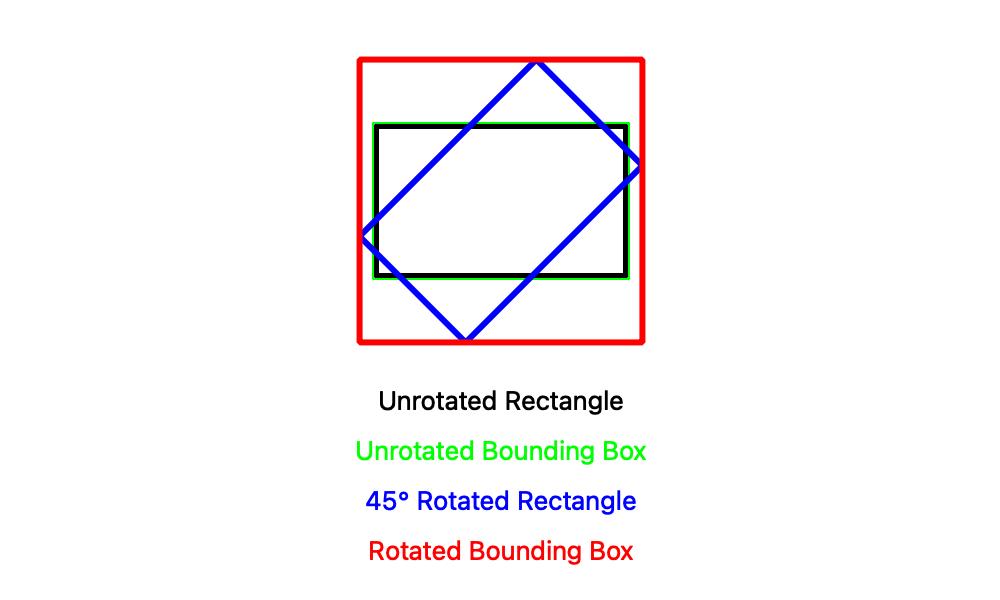
| Function | Description |
|---|---|
getBoundingPosition() |
Return the object's position, the top-left corner of its bounding box. |
getBoundingX() |
Return the object's bounding box horizontal position. |
getBoundingY() |
Return the object's bounding box vertical position. |
getBoundingCenter() |
Return the object's bounding box center point. |
getBoundingCenterX() |
Return the object's bounding box horizontal center. |
getBoundingCenterY() |
Return the object's bounding box vertical center. |
getBoundingSize() |
Return the object's bounding box width and height. |
getBoundingWidth() |
Return the object's bounding box width. |
getBoundingHeight() |
Return the object's bounding box height. |
getEndpoints() |
Return the object's post-rotation endpoints. |
Visibility Functions
| Function | Description |
|---|---|
getVisibility() |
Return how visible the object is. |
setVisibility(visibility) |
Set how visible the object is. |
Color Functions
| Function | Description |
|---|---|
getColor() |
Return the object's color. |
setColor(color) |
Set the object's color. |
getFill() |
Report whether the object is filled in. |
setFill(fill) |
Set whether the object is filled in. |
getThickness() |
Return the object's outline thickness. |
setThickness(thickness) |
Set the object's outline thickness. |
Information Functions
| Function | Description |
|---|---|
getGroup() |
Return the Group this object belongs to. |
getDisplay() |
Return the Display this object is on. |
setToolTipText(text) |
Set the hover text shown over the object. |
Hit-Testing Functions
| Function | Description |
|---|---|
contains(x, y) |
Report whether a point lies inside the object. |
intersects(other) |
Report whether this object overlaps another. |
encloses(other) |
Report whether this object completely contains another. |
Event Functions
Event functions are used to set callback functions that are called whenever something happens, such as the mouse moving or a key being pressed.
Mouse Events
See Mouse Events for more information on how to use mouse events.
| Function | Description |
|---|---|
onMouseClick(action) |
Register a function to call when the mouse is clicked (pressed down and released) on this object. |
onMouseDown(action) |
Register a function to call when the mouse button is pressed on this object. |
onMouseUp(action) |
Register a function to call when the mouse button is released over this object. |
onMouseMove(action) |
Register a function to call when the mouse moves over this object. |
onMouseDrag(action) |
Register a function to call when the mouse is dragged over this object. |
onMouseEnter(action) |
Register a function to call when the mouse moves onto this object. |
onMouseExit(action) |
Register a function to call when the mouse moves off this object. |
Keyboard Events
See Keyboard Events for more information on how to use keyboard events.
| Function | Description |
|---|---|
onKeyType(action) |
Register a function to call when a key is typed (pressed and released). |
onKeyDown(action) |
Register a function to call when a key is pressed down. |
onKeyUp(action) |
Register a function to call when a key is released. |